For years, many of us have been running plain old vSphere clusters—solid, reliable, and battle-tested. But IT doesn’t stand still, and neither do the demands from the business. Modern workloads (AI, ML, containers) need more than just hypervisors—they need an integrated private cloud model. That’s where VMware Cloud Foundation (VCF) 9.0 comes in.
VCF 9.0 isn’t just another upgrade; it’s a shift in how you run your infrastructure. It consolidates vSphere, vSAN, and NSX into one platform, simplifies licensing, and gives you a proper framework for managing hybrid workloads at scale. Think of it as taking your existing vSphere environment and finally giving it the governance and structure it always should have had.
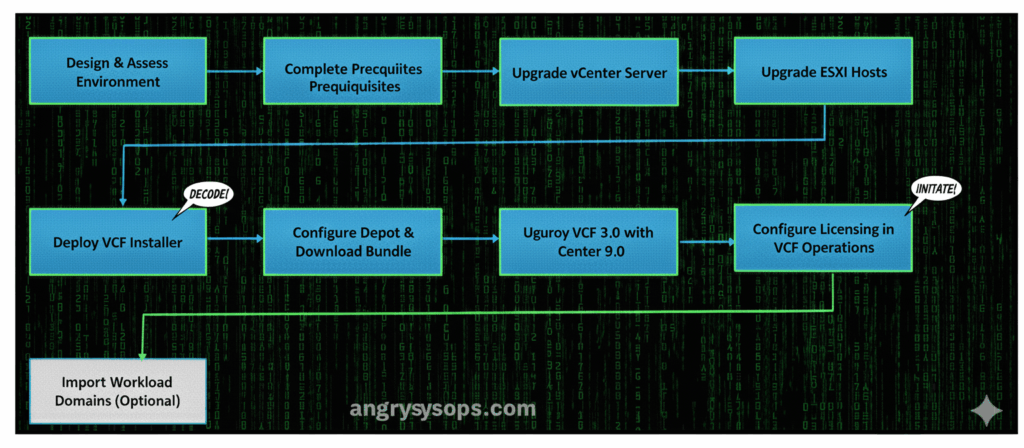
Here’s the high-level upgrade path if you’re planning to take the plunge.
🔥 Side Quest for SysAdmins 🔥
I’m building HackMeNow – a terminal-style hacking puzzle game.
Back it on Kickstarter and help bring it to life:
Step 1: Plan Before You Panic
Before you start downloading ISOs, step back and design for VCF 9.0.
- Check if your hardware actually qualifies (HCL is your friend).
- Understand the new licensing model (it’s simplified, but you’ll want to know what you’re paying for).
- Map out which workloads move first—don’t try to forklift everything at once.
- Nail down your network, storage, and security policies. Once VCF is in place, those will be the backbone of everything.
Step 2: Tick Off the Prerequisites
Get your vSphere house in order:
- Upgrade vSAN and NSX (if you use them).
- Take proper backups (vCenter, ESXi, configs—don’t get lazy here).
- Double-check DNS, NTP, and network reachability.
- Make sure you’re already at the minimum vSphere versions VCF 9.0 requires.
Step 3: Upgrade vCenter
Start with the brain.
- Move vCenter to 9.0 first.
- Verify your plugins, APIs, and integrations won’t blow up.
- Test host connectivity before you move on.
Step 4: Upgrade Your Hosts
Once vCenter is happy:
- Put hosts into maintenance mode (vMotion is your friend).
- Upgrade ESXi to 9.0.
- Validate host profiles, adapters, and networking.
Step 5: Deploy the VCF Installer
Now for the orchestration piece.
- Deploy the installer into your shiny upgraded environment.
- Hook it into the management network.
- Confirm it can reach the depot for software bundles.
Step 6: Get the Bundle
- Configure depot connectivity (online or offline).
- Pull down the VCF 9.0 bundle.
- Verify checksums before you let it anywhere near production.
Step 7: Deploy VCF 9.0
The real fun begins.
- Use the installer to deploy VCF 9.0 on top of vCenter 9.0.
- This converts your vSphere environment into a managed VCF framework.
- Start with the Management Domain—it lays the foundation for all workload domains.
Step 8: Sort Out Licensing
VCF 9.0 introduces unified licensing.
- Apply the single license file in VCF Operations.
- Make sure vCenter, ESXi, and NSX are all covered.
Step 9: (Optional) Import Workload Domains
If you’ve got existing clusters:
- Bring them into VCF governance using the Import function.
- Align policies with your new management domain.
Why Bother Upgrading?
- Unified operations – Manage vSphere, vSAN, and NSX in one place.
- Modern workload support – Run VMs, containers, and AI workloads without bolt-ons.
- Simplified licensing – One license file to rule them all.
- Fleet management – Run multiple VCF instances at scale.
🔥 Side Quest for SysAdmins 🔥
I’m building HackMeNow – a terminal-style hacking puzzle game.
Back it on Kickstarter and help bring it to life:
Final Thoughts
Upgrading to VCF 9.0 is less about ticking a box and more about setting yourself up for the next decade of IT. If you’re just running vSphere today, this is the logical next step to reduce complexity while future-proofing your environment.
Do it right, and your infra team won’t just keep the lights on—they’ll be running a proper private cloud platform with governance, scalability, and room for all those AI/ML workloads your business is already asking about.
Subscribe to the channel: youtube.be/@AngryAdmin 🔥
🚨Dive into my blog: angrysysops.com
🚨Snapshots 101: a.co/d/fJVHo5v
🌐Connect with us:
- 👊Facebook: facebook.com/AngrySysOps
- 👊X: twitter.com/AngrySysOps
- 👊My Podcast: creators.spotify.com/pod/show/angrysysops
- 👊Mastodon: techhub.social/@AngryAdmin
💻Website: angrysysops.com
🔥vExpert info: vExpert Portal