If you run VMware Cloud Foundation, check your SDDC Manager version and get the appropriate workaround into your change process. Broadcom’s VMSA-2026-0008.1 addresses CVE-2026-111497, a remote code execution vulnerability in the Node.js Brotli decoder used by SDDC Manager.
The highest severity applies to SDDC Manager 9.1.1.x: Critical, CVSSv3 9.8. The affected older releases listed in the advisory are rated Important, CVSSv3 7.5. As of 28 October, the response matrix still shows patch pending. Broadcom advisory
My recommendation is to prioritise the applicable mitigation, verify it, and keep the permanent fix on the change calendar. A completed workaround should not be the point where this issue disappears from view.
What changed in revision .1
Broadcom issued the original advisory on 27 October and revision .1 on 28 October to clarify the affected products in the response matrix. The revised matrix lists VMware Cloud Foundation, with SDDC Manager as the affected component. Use that current matrix when assessing scope. Revision history
What the vulnerability does
Brotli is a compression format. The Node.js security notice explains that malformed compressed input can cause the bundled decoder to write beyond an internal buffer. An application that decompresses attacker-controlled Brotli data can consequently suffer memory corruption, crashes, disclosure of process memory, or remote code execution. Node.js security notice
For SDDC Manager, Broadcom identifies an attacker with network access as the relevant threat. That makes access to the management interface an immediate operational consideration. Broadcom advisory
There is also a wider exploitation signal. Canada’s Cyber Centre reports that CISA added this CVE to its Known Exploited Vulnerabilities catalogue on 27 October. That concerns the underlying Brotli vulnerability; it does not, by itself, establish exploitation of SDDC Manager specifically. Cyber Centre alert
Affected versions and the correct workaround
| SDDC Manager release in the VMSA | Severity | CVSSv3 | Workaround reference |
|---|---|---|---|
| 9.1.1.x | Critical | 9.8 | KB 460732 |
| 9.0.x and 9.1.0 | Important | 7.5 | KB 460734 |
| 5.2.x | Important | 7.5 | KB 460734 |
Source: VMSA-2026-0008.1 response matrix.
The walkthrough below applies to SDDC Manager 9.1.1 and 9.1.1 EP. It follows KB 460732.
For older versions, use KB 460734. Its current Environment section names VCF 5.2.x, 9.0.2, and 9.1.0. It uses a Node.js preload and service configuration change, so do not substitute the 9.1.1.x instructions. If your exact build falls outside that documented scope, confirm the applicable procedure with Broadcom Support. Older-version workaround
How the 9.1.1.x mitigation works
The workaround rejects request bodies declaring Content-Encoding: br before they reach Brotli decompression. It does this in two places:
- nginx on HTTPS port 443, where matching requests receive HTTP
415 Unsupported Media Type. - The UI application on 127.0.0.1:7500, where middleware rejects matching requests before the body parser runs.
Both changes are required by the procedure. Requests sent directly to the local UI listener do not pass through nginx. The loopback address here does not mean port 7500 is externally exposed.
This is a temporary mitigation for this CVE. It does not replace the vulnerable runtime, and it is designed to leave other encodings, including gzip and deflate, alone.
Step 1 — Back up the appliance and configuration
Read the current advisory and KB before starting. Take a backup of the SDDC Manager appliance, then connect through SSH as vcf and switch to root.
Plan for a UI service restart during the change. Back up both files that the workaround modifies:
APP=/opt/vmware/vcf/sddc-manager-ui-app/server/src/servers/sddcManagerServer/app.js

cp -p "$APP" "$APP.orig-cve111497"
cp -p /etc/nginx/nginx.conf /root/nginx.conf.before-cve111497
Keep these original backups intact. If you are returning to an earlier attempt, do not overwrite them with files that already contain the workaround. The APP variable belongs to the current shell; set it again if you reconnect.
Step 2 — Block Brotli request bodies in nginx
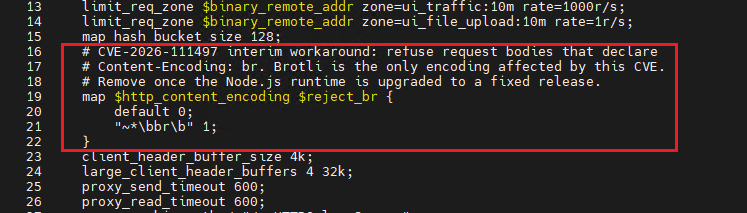
Edit /etc/nginx/nginx.conf. Inside the existing http { ... } block, immediately after map_hash_bucket_size 128;, add:
# CVE-2026-111497 interim workaround: refuse Brotli request bodies.
map $http_content_encoding $reject_br {
    default 0;
    "~*\bbr\b" 1;
}
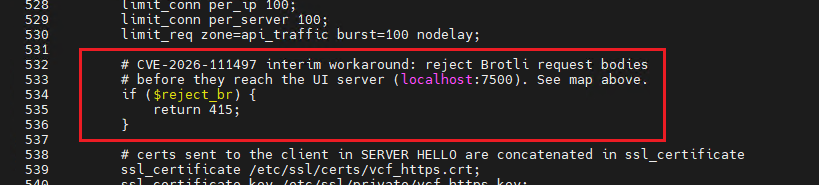
Inside the existing server block containing listen 443 ssl;, add the following after the limit_req line and before the comment beginning # certs sent to the client in SERVER HELLO:
# CVE-2026-111497 interim workaround: reject before the UI server.
if ($reject_br) {
    return 415;
}
Validate the configuration and reload nginx only if validation succeeds:
nginx -t && systemctl reload nginx
If validation fails, stop, restore the original configuration, and contact Broadcom Global Support:
cp -p /root/nginx.conf.before-cve111497 /etc/nginx/nginx.conf
nginx -t
Step 3 — Add the check inside the UI application
Edit the file referenced by APP:
/opt/vmware/vcf/sddc-manager-ui-app/server/src/servers/sddcManagerServer/app.jsFind this line:
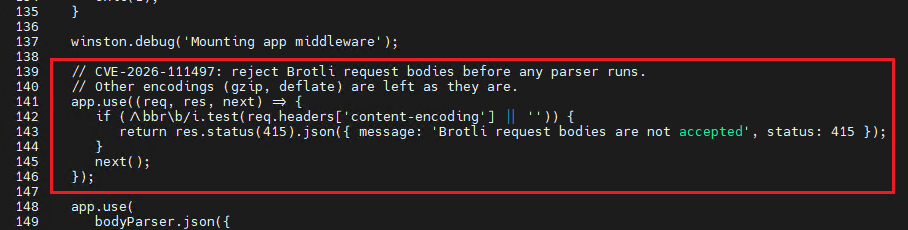
winston.debug('Mounting app middleware');Immediately below it, before app.use(bodyParser.json({... and before any body parser runs, insert:
// CVE-2026-111497: reject Brotli request bodies before any parser runs.
// Other encodings (gzip, deflate) are left as they are.
app.use((req, res, next) => {
    if (/\bbr\b/i.test(req.headers['content-encoding'] || '')) {
        return res.status(415).json({
            message: 'Brotli request bodies are not accepted',
            status: 415
        });
    }
    next();
});
Placement matters: a check that runs after decompression cannot protect that earlier processing step.
Restart the UI service:
systemctl restart sddc-manager-ui-appThen use the KB’s polling loop to wait for a response:
for i in $(seq 1 40); do
  c=$(curl -s -o /dev/null -w '%{http_code}' \
      -X POST http://127.0.0.1:7500/ui/api/ping \
      -H 'Content-Type: application/json' \
      --data-binary '{"a":1}')
  [ "$c" != 503 ] && [ "$c" != 000 ] && break
  sleep 6
done
echo "ui_code=$c"
The loop allows 40 attempts with six-second pauses. A value other than 503 or 000 means an HTTP response was received, but it is only a readiness check. Continue with the validation below and confirm that the UI works normally.
Step 4 — Verify both request paths
Run these checks on the SDDC Manager appliance. The commands below expand the KB’s abbreviated examples.
Brotli header sent directly to the UI — expect 415:
curl -sS -o /dev/null -w '%{http_code}\n' \
  -X POST http://127.0.0.1:7500/ui/api/ping \
  -H 'Content-Type: application/json' \
  -H 'Content-Encoding: br' \
  --data-binary '{"a":1}'
Brotli header sent through nginx — expect 415:
curl -ksS -o /dev/null -w '%{http_code}\n' \
  -X POST https://127.0.0.1/ui/api/ping \
  -H 'Content-Type: application/json' \
  -H 'Content-Encoding: br' \
  --data-binary '{"a":1}'
These two requests deliberately contain ordinary JSON labelled as Brotli. They test header rejection before decoding; they are not compressed exploit payloads or proof that the runtime has been patched.
Plain JSON through nginx — expect the endpoint’s normal response, not 415:
curl -ksS -o /dev/null -w '%{http_code}\n' \
  -X POST https://127.0.0.1/ui/api/ping \
  -H 'Content-Type: application/json' \
  --data-binary '{"a":1}'
An unauthenticated request may receive 401 or 403, as noted in the KB.
A gzip-compressed body through nginx — expect the endpoint’s normal response, not 415:
printf '%s' '{"a":1}' | gzip -c | \
  curl -ksS -o /dev/null -w '%{http_code}\n' \
    -X POST https://127.0.0.1/ui/api/ping \
    -H 'Content-Type: application/json' \
    -H 'Content-Encoding: gzip' \
    --data-binary @-
Adding a gzip header to uncompressed JSON would test an invalid request. The pipe above supplies an actual gzip body.
The -k option is used for these local HTTPS checks, where the certificate may not match 127.0.0.1. Keep normal certificate validation for routine connections.
Do not count 000, 503, or an unexplained server error as a successful non-Brotli test merely because it is not 415. Confirm that the service is available and that normal authenticated UI operations still work.
Finally, check that the expected configuration entries exist:
nginx -T 2>/dev/null | grep -c reject_br
# Expected: 2 — the map and the if condition.

grep -c 'CVE-2026-111497' "$APP"
# Expected: 1 — the middleware comment.
These counts support the HTTP checks; they do not replace them. If the expected behaviour is missing, follow the KB’s instruction to stop, roll back, and contact Broadcom Global Support.
Step 5 — Roll back if required
To restore the files saved before the change:
APP=/opt/vmware/vcf/sddc-manager-ui-app/server/src/servers/sddcManagerServer/app.js

cp -p "$APP.orig-cve111497" "$APP"
cp -p /root/nginx.conf.before-cve111497 /etc/nginx/nginx.conf
nginx -t && systemctl reload nginx
systemctl restart sddc-manager-ui-app
Check each command’s result and verify UI availability afterwards. Restoring these files also removes this mitigation, so keep the security issue open and work with Support on the next action.
Keep the permanent fix in scope
Record the appliance version, the changes made, and the verification results in the change ticket. Restrict management access to the systems and administrators that need it, and review unexpected UI crashes or service failures.
Track the advisory for a product fix and follow Broadcom’s instructions for applying it and retiring the temporary changes. After maintenance that changes the UI application or nginx configuration, recheck the applicable guidance and mitigation state. Follow the appliance’s supported remediation path rather than making an ad hoc replacement of its bundled Node.js runtime.
Validation note: This walkthrough is based on the vendor procedure. The commands have not been executed on an SDDC Manager appliance for this article.
References
- Broadcom VMSA-2026-0008.1
- KB 460732 — SDDC Manager 9.1.1.x workaround
- KB 460734 — older-version workaround
- Node.js security releases — 21 October 2026