Deploying VMware Cloud Foundation (VCF) into a “Brownfield” environment is notoriously unforgiving. Unlike a fresh install, a brownfield deployment requires your existing ESXi hosts to meet a strict Bill of Materials (BOM).
If a single host has a vMotion MTU of 1500 instead of 1600, or if a TPM 2.0 chip is disabled in BIOS, the VCF “Bring-Up” process will fail. Finding these issues manually across hundreds of hosts isn’t just tedious—it’s a recipe for deployment failure.
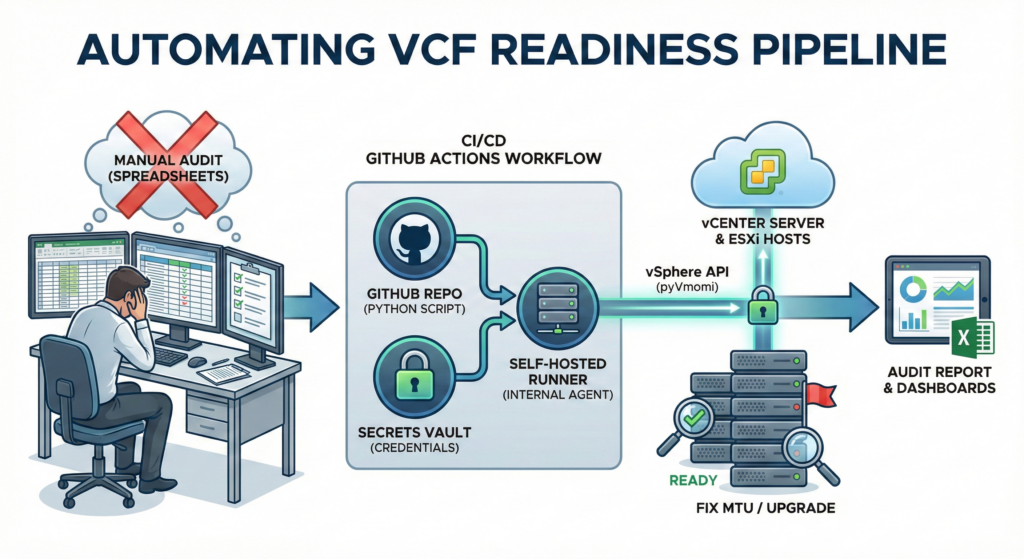
In this post, I’ll explain how we automated this audit using Python (pyVmomi) and GitHub Actions, turning a week-long manual audit into a 2-minute automated pipeline.
The Architecture
We moved away from running scripts on admin laptops to a centralized, automated approach. The solution relies on three core components:
- The Brain (Python): A script that uses the vSphere API to inspect deep configuration details.
- The Vault (GitHub Secrets): Storing credentials securely, ensuring no passwords ever live in the code.
- The Bridge (Self-Hosted Runner): A Linux agent inside our management network that connects GitHub Actions to our internal vCenters.
🚀 Follow Me on X – New Account
My previous X account @AngrySysOps was suspended.
I am continuing the same tech, cybersecurity, and engineering discussions under a new handle.
Follow @TheTechWorldPod on X for daily insights, threads, and podcast updates.
Part 1: The Python “Brain”
The core of this solution is a Python script using pyVmomi. We didn’t just want a list of hosts; we needed a deep dive into specific VCF prerequisites. Here are the critical mechanisms we built:
1. Recursive Inventory Discovery
Most scripts just loop through a cluster. But in a complex brownfield environment, hosts might be in maintenance folders, staging clusters, or completely standalone.
We used the ContainerView API to ask vCenter for every host, regardless of where it hides in the folder hierarchy:
def get_all_hosts(content):
    # The 'recursive=True' flag is the key here.
    # It finds all HostSystem objects from the root down.
    view_ref = content.viewManager.CreateContainerView(
        container=content.rootFolder,
        type=[vim.HostSystem],
        recursive=True
    )
    return view_ref.view
2. Validating VCF Networking (The “Jumbo Frame” Trap)
VCF requires the vMotion network to run on a Distributed Switch (VDS) and support Jumbo Frames (MTU ≥ 1600). A standard MTU of 1500 is a guaranteed failure.
We built a specific function to hunt for this configuration:
def check_vmotion_details(host_obj):
    details = {"MTU": "None", "on_VDS": "No"}
    # Iterate through every virtual NIC on the host
    for vnic in host_obj.config.network.vnic:
        if vnic.spec.vMotionEnabled:
            details["MTU"] = vnic.spec.mtu
            # Check if it's backed by a Distributed Port
            if vnic.spec.distributedVirtualPort:
                details["on_VDS"] = "Yes"
            break
    return details
3. Secure Connection Handling
Hardcoding credentials is a security violation. Instead, our script expects credentials to be injected as Environment Variables at runtime. If they are missing, the script fails fast and safely.
# We never store passwords in the .py file
hosts_string = os.getenv('VCENTER_HOST')
user = os.getenv('VCENTER_USER')
password = os.getenv('VCENTER_PASS')

if not all([hosts_string, user, password]):
    print("CRITICAL: Missing credentials via Environment Variables.")
    exit(1)
Part 2: The Workflow: Infrastructure as Code
To run this at scale, we use a GitHub Actions workflow. The magic happens in how we connect our public repository to our private infrastructure using a Self-Hosted Runner.
The Workflow YAML (also available in my Github repo)
Here is the configuration that ties it all together. Notice how we map the repository secrets to the script’s environment variables:
name: VCF Readiness Scan

jobs:
  scan-vcenters:
    # This label targets our internal Linux VM, not the public cloud
    runs-on: self-hosted

    steps:
    - name: Checkout Code
      uses: actions/checkout@v4

    - name: Install Dependencies
      run: |
        python3 -m pip install --user pyvmomi pandas openpyxl matplotlib

    - name: Run VCF Scan
      env:
        # Injecting secrets securely at runtime
        VCENTER_HOST: ${{ secrets.VCENTER_HOST }}
        VCENTER_USER: ${{ secrets.VCENTER_USER }}
        VCENTER_PASS: ${{ secrets.VCENTER_PASS }}
      run: |
        python3 vcf-ready.py

    - name: Upload Audit Report
      uses: actions/upload-artifact@v4
      with:
        name: VCF-Readiness-Report
        path: VCF_Readiness_Report.xlsx
Why This Matters
By treating our infrastructure audit as code, we achieved three major wins:
- Security: No more shared passwords or config files on admin laptops. The credentials live in the GitHub Vault and are only exposed for the milliseconds the script needs to authenticate.
- Accuracy: The recursive Python logic ensures we never miss a “zombie” host that was left in a staging folder, which could otherwise block the VCF expansion.
- Actionable Data: The script outputs a simple Excel file with status flags like
FIX MTUorUPGRADE VC. This gives our Network and Compute teams a clear “To-Do” list before we even schedule the maintenance window.
Automation isn’t just about saving time; it’s about removing the “I thought I checked that” factor from critical infrastructure upgrades.
🚀 Follow Me on X – New Account
My previous X account @AngrySysOps was suspended.
I am continuing the same tech, cybersecurity, and engineering discussions under a new handle.
Follow @TheTechWorldPod on X for daily insights, threads, and podcast updates.
@angrysysops.com
🚀 Follow Me on X – New Account
My previous X account @AngrySysOps was suspended.
I am continuing the same tech, cybersecurity, and engineering discussions under a new handle.
Follow @TheTechWorldPod on X for daily insights, threads, and podcast updates.